Greetings I’ve installed libretime-4.5.0 using the installer on Ubutu -20.04. I’ve also ran the following command: sudo apt-get install libfltk1.3-dev portaudio19-dev libopus-dev libmp3lame-dev libvorbis-dev libogg-dev libflac-dev libfdk-aac-dev libdbus-1-dev libsamplerate0-dev libssl-dev libcurl4-openssl-dev libportmidi-dev
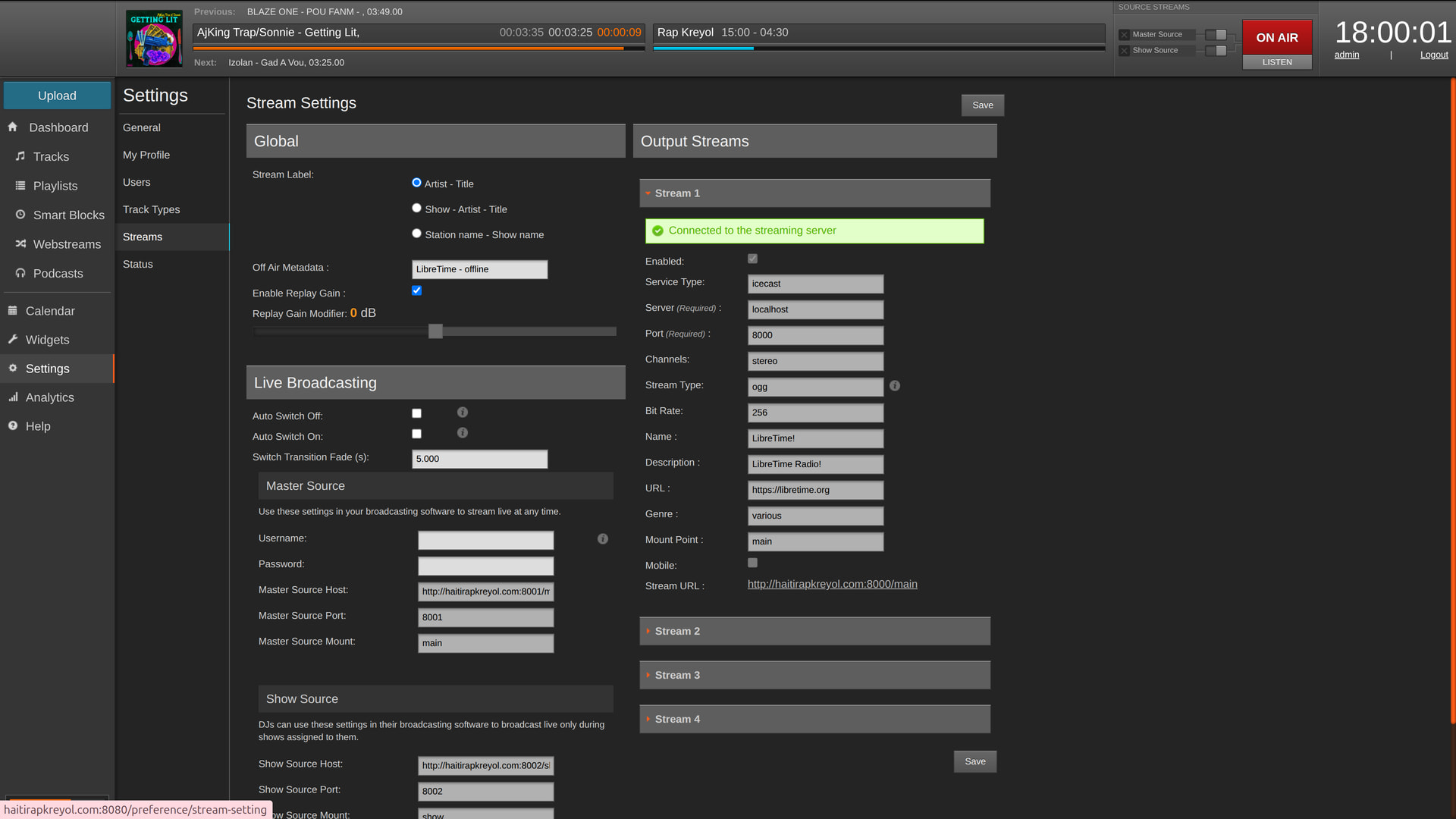
In the setting, Stream all of the information is greyed out and I cannot modify it from my admin panel http://haitirapkreyol.com:8080/preference/stream-setting how can I change the stream to broadcast in 64kbps in AAC+ format? I also have access to the icecast2 admin panel and http://haitirapkreyol.com:8000/admin/ and icecast2 config file via sudo nano /etc/icecast2/icecast.xml
What are the steps that I must take in order to accomplish such goal?
Since you don’t have access to my admin page please view the uploaded pictures. In my research I saw a post mentioning AAC support bu that was for Debian distro, I failed to find instrunction regarding Ubutu -20.04.
LibreTime version: libretime-4.5.0
Installation method and OS / Environment
The method used to install and the operating system / environment your installation is running on.
Operating system: Ubuntu-20.04